HASNIT3CH Remove Device Management (MDM) – Professional iPhone MDM Bypass & Removal Tool
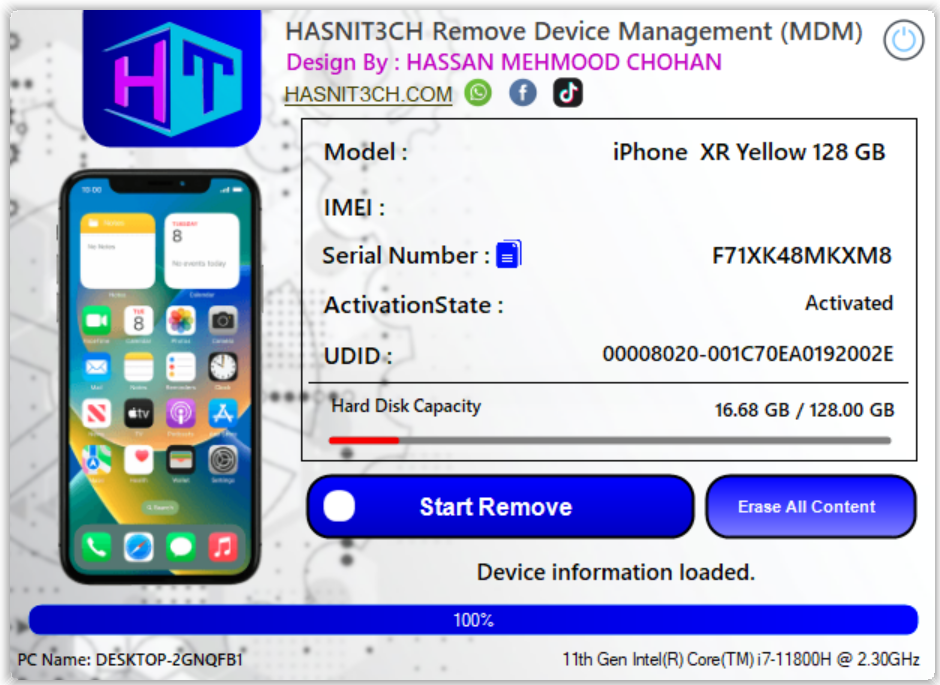
HASNIT3CH Remove Device Management (MDM) is a professional Windows tool that permanently removes and bypasses Mobile Device Management (MDM) locks and Remote Management profiles from iPhone and iPad devices. Developed by Hassan Mahmood Chohan (HASNIT3CH) for professional iPhone repair technicians, GSM resellers, and unlocking shops.
What is HASNIT3CH Remove Device Management (MDM)?
HASNIT3CH Remove Device Management is a Windows desktop tool that removes the iPhone MDM lock (Remote Management / "This iPhone is managed by...") from iPhone and iPad devices. MDM is a corporate or school management profile that restricts device functionality — blocking app installation, settings access, and full device use. This tool removes the MDM profile completely and permanently, restoring full unrestricted access to the device.
What is MDM Lock on iPhone and iPad?
MDM (Mobile Device Management) is a profile installed on iPhones and iPads by companies, schools, and organizations to remotely manage and control the device. When you buy a second-hand iPhone or iPad that was previously enrolled in a corporate or school program, it may show a Remote Management screen during setup:
- "This iPhone is managed by [Organization Name]"
- Restricted or blocked App Store access
- Locked settings and configuration profiles
- Remote monitoring and control by the previous organization
- Forced VPN, email profiles, and content restrictions
HASNIT3CH MDM Removal Tool eliminates all of these restrictions permanently, giving you a clean, fully functional device.
Key Features of HASNIT3CH MDM Removal Tool
Complete MDM Profile Removal
Removes the MDM management profile from the device entirely — not just a temporary bypass, but a full permanent removal. The device is no longer recognized as managed by any organization.
Supervision Removal
Removes Apple’s device supervision, which is commonly installed alongside MDM on corporate and school devices. After removal, the device is fully unsupervised.
Restriction-Free Device
After MDM removal, the iPhone or iPad regains full functionality — App Store access, all settings, iCloud, and no remote management by any third party.
Windows-Based Tool, No Dongle
Runs entirely on Windows (7, 8, 10, 11). No additional hardware or dongle required — connect your device via USB and remove MDM in minutes.
Real-Time Device Detection
Automatically detects the connected device model, iOS version, MDM profile status, and supervision status before starting the removal process.
Safe & Non-Destructive
MDM removal is performed without erasing device data wherever possible. User data, apps, and settings remain intact after the process.
How to Remove MDM from iPhone – Step by Step
- Connect your MDM-locked iPhone or iPad to a Windows PC via USB.
- Open HASNIT3CH Remove Device Management — the device is auto-detected.
- The tool displays the current MDM profile and supervision status.
- Click Remove MDM to start the removal process.
- Wait for the completion confirmation.
- Done — the device is free from all MDM restrictions and Remote Management.
Technical Specifications
- Platform: Windows 7, 8, 10, 11 (x64)
- Developer: Hassan Mahmood Chohan (HASNIT3CH)
- Target: iPhone and iPad with MDM / Supervision / Remote Management lock
- Connection: USB | Dongle: Not required
- Data Safety: Non-destructive removal (no data wipe)
- Interface: C# WinForms, professional dark UI with real-time log
Who Needs iPhone MDM Removal?
- Second-hand iPhone buyers who received a device with MDM from a previous corporate or school owner
- Repair shops handling MDM-locked iPhones brought in by customers
- GSM resellers who need to clean MDM from bulk device purchases
- IT technicians removing old management profiles from decommissioned company devices
Frequently Asked Questions
What is HASNIT3CH Remove Device Management?
It is a professional Windows tool that permanently removes MDM (Mobile Device Management) profiles, supervision, and Remote Management from iPhone and iPad devices.
What is MDM lock on iPhone?
MDM is a corporate or school management profile that restricts device functionality. It can block the App Store, lock settings, and give remote control to an organization. HASNIT3CH MDM tool removes it completely.
Does MDM removal delete data?
No. The removal process is non-destructive wherever possible, preserving user data, apps, and settings on the device.
Will the MDM come back after removal?
No. Once removed with HASNIT3CH MDM Removal Tool, the management profile is permanently eliminated. The device will not reconnect to the previous MDM server.
Does it work on all iPhones and iPads?
The tool supports a wide range of iPhone and iPad models. Contact HASNIT3CH for specific device and iOS version compatibility.
Do I need a hardware dongle?
No. HASNIT3CH Remove Device Management is a pure software tool — no dongle or hardware key required.
Can I use it in my repair shop?
Yes. The tool is specifically designed for professional repair technician use in daily repair shop environments.
What is the difference between MDM bypass and MDM removal?
MDM bypass hides the MDM temporarily; MDM removal deletes the management profile permanently. HASNIT3CH performs permanent removal for a clean, unrestricted device.
Where can I buy HASNIT3CH Remove Device Management?
Contact: [email protected] | WhatsApp +923038736868 | hasnit3ch.com
Conclusion
If you need a reliable, permanent iPhone MDM removal and Remote Management bypass solution for iPhone and iPad, HASNIT3CH Remove Device Management is the professional tool for repair shops and technicians. Fast, Windows-based, no dongle, no data loss — MDM removed in minutes. HASNIT3CH — professional tools for professional repair shops.